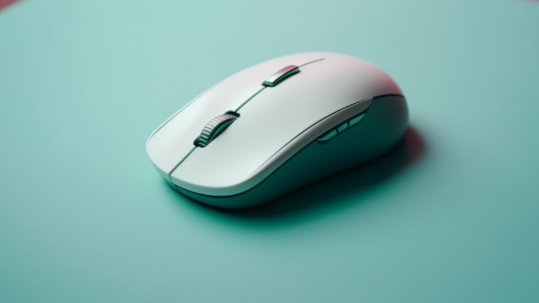

Wireless gaming mice have become a popular choice for players who want greater freedom, accurate control and a comfortable gaming experience. With improved sensors, reliable connections and longer battery life, these devices can meet the needs of casual players and competitive gamers alike. They also help create a cleaner desk setup by removing the cable that can restrict movement during intense matches.
Choosing the right wireless gaming mouse involves more than looking at its appearance or price. Factors such as tracking accuracy, response time, battery performance, button layout and ergonomics all affect how well a mouse performs. Understanding these features makes it easier to select a device that suits different games, playing styles and personal preferences.
The Benefits of Wireless Technology in Gaming
Wireless technology gives gamers more freedom to move their mouse without dealing with a cable that catches on the edge of a desk or pulls against their hand. This freedom can be especially useful when making quick movements in competitive games, where smooth control and consistent positioning matter.
Modern wireless gaming mice can deliver performance comparable to wired alternatives. Reliable wireless connections and improved signal processing help reduce delays, allowing movements to register quickly on screen. However, performance varies between models, so gamers should consider the connection technology and specifications before making a purchase.
A wireless setup can also make a gaming desk look tidier. With fewer cables around the keyboard and mouse area, it becomes easier to organise accessories, clean the surface and adjust the position of other equipment. For gamers who regularly move between work and gaming, this flexibility can be particularly useful.
See also: Managing High-Volume Crew Sanitation on Commercial Build Sites
Precision and Performance Features
Accuracy is one of the most important qualities of a gaming mouse. Modern models use optical sensors to track movement across a surface, helping players aim, navigate and react with greater control. Sensor quality, tracking consistency and suitable sensitivity settings can all influence performance.
DPI, or dots per inch, describes how far the cursor moves in response to physical mouse movement. A higher DPI setting makes the cursor travel further with smaller hand movements, while a lower setting offers more controlled movement across the screen. The ideal setting depends on personal preference, screen size and the type of game being played.
First-person shooter players often prefer settings that support steady aiming, while players of strategy games may choose faster cursor movement to navigate large areas quickly. A mouse with adjustable DPI allows users to experiment until they find a comfortable balance.
Polling rate is another specification worth checking. It indicates how frequently the mouse reports its position to the computer. A higher polling rate can provide more frequent updates, although the practical benefit depends on the system, game and user’s needs.
Programmable buttons can also improve efficiency. Players can assign actions, shortcuts or commands to additional buttons, reducing the need to reach for the keyboard during gameplay. This feature is particularly helpful in games with complex controls, provided the button arrangement feels natural.
Battery Life and Charging Convenience
Battery performance is an important consideration when choosing a wireless gaming mouse. A device that requires frequent charging can interrupt gaming sessions and become inconvenient for regular use. Checking the manufacturer’s estimated battery life helps buyers understand what to expect.
Actual battery performance depends on factors such as polling rate, lighting effects, connection mode and usage patterns. RGB lighting may increase power consumption, while energy-saving features can help extend operating time. Some models allow users to reduce lighting brightness or switch off illumination when it is unnecessary.
Rechargeable batteries offer convenient everyday use because the mouse can be powered up again instead of requiring disposable batteries. Certain models support quick charging, allowing users to gain additional playing time after a short charging period.
Other devices support charging docks or compatible wireless charging systems. These options can reduce the need to connect a cable directly to the mouse, although the required accessories may increase the overall cost.
Before buying, consider how often the mouse will be used and whether charging fits comfortably into your routine. Battery indicators and low-power notifications are also useful because they provide a warning before the device runs out of charge.
Comfort and Ergonomic Design
Comfort matters when gaming sessions last several hours. A poorly shaped mouse can place unnecessary pressure on the fingers, wrist and forearm, making extended use less enjoyable. Choosing a suitable design helps support natural hand positioning and improves control.
Wireless gaming mice come in different shapes and sizes. Some have a rounded profile that supports the palm, while others have a lower shape that suits players who prefer more contact between their fingertips and the mouse. The best option depends on hand size, grip style and personal comfort.
Palm, claw and fingertip grips each create different contact points between the hand and mouse. A palm grip generally involves resting much of the hand on the device. A claw grip keeps the fingers more arched, while a fingertip grip relies mainly on the fingertips for movement.
Weight is another factor to consider. Lightweight mice can make rapid movements easier for some players, while heavier designs may feel more stable to others. Neither option is automatically better, so testing different models can help identify the most comfortable choice.
Surface texture and side grips can improve handling, especially when hands become warm during intense gameplay. Regular breaks, relaxed hand positioning and a suitable desk height can also help reduce discomfort during prolonged computer use.
Connectivity and Device Compatibility
A wireless gaming mouse may connect through Bluetooth or a dedicated USB receiver. Bluetooth can be convenient for everyday computer use because it often avoids occupying a USB port. However, dedicated wireless receivers are commonly preferred for gaming because supported models can provide fast, consistent connections.
Some mice offer both connection methods, allowing users to switch between gaming and general computer tasks. This flexibility can be useful when working across multiple devices, although compatibility depends on the mouse and the equipment being used.
Before purchasing, check whether the mouse supports your operating system and intended device. Windows and macOS support varies by model, while Linux compatibility may depend on available software and configuration tools. Console compatibility should also be verified rather than assumed.
Wireless interference can affect connection stability in some environments. Keeping the receiver close to the mouse, using a suitable USB port and avoiding unnecessary obstacles can help maintain reliable communication. Following the manufacturer’s setup instructions is also important.
Choosing the Right Wireless Gaming Mouse
The best wireless gaming mouse is one that matches your needs without making you pay for features you will rarely use. Competitive players may prioritise low latency, accurate tracking and a lightweight design. Casual gamers might prefer comfort, simple controls and dependable battery life.
Budget is another consideration. Entry-level models can provide useful wireless performance, while premium options may include additional buttons, advanced sensors, adjustable weights or specialised charging features. Comparing specifications and checking independent reviews can help determine whether extra features offer genuine value.
Build quality should not be overlooked. Buttons should feel responsive, the scroll wheel should operate consistently, and the shell should feel secure during movement. Warranty coverage and customer support may also matter when choosing between similar products.
What to Expect from Future Gaming Mice
Wireless gaming technology continues to improve, with manufacturers focusing on responsiveness, power efficiency and user comfort. Further developments may bring better battery management, more refined sensor performance and improved ways to customise controls.
Software may also offer more flexible profiles for different games and applications. These profiles can save sensitivity settings, button assignments and lighting preferences, allowing users to switch configurations without adjusting every setting manually.
Features such as haptic feedback may provide additional tactile information in compatible devices, although their usefulness will depend on implementation and individual preferences. New features should be judged by how effectively they improve gameplay rather than by novelty alone.
Conclusion
Wireless gaming mice offer freedom of movement, precise tracking and convenient desk organisation without requiring players to compromise on essential performance. The right model combines a reliable connection, suitable sensitivity, comfortable ergonomics and battery life that fits everyday use.
By comparing these features carefully, gamers can choose a mouse that supports their preferred games and playing style. A well-matched device can make gameplay feel smoother, improve comfort and provide dependable control throughout regular gaming sessions.